
Automate Light for Your Houseplants: Smart Shade Routines for Fall and Winter

Your monstera does not care what time your alarm goes off. It cares about how many hours of usable light reach its leaves, and in October that number starts dropping fast. The days get shorter, the sun sits lower, and the plants you carried in from the balcony are suddenly competing for one bright window. A smart shade cannot add hours to the day, but it can make sure your plants get every useful minute of the light you do have.
Why Fall Changes the Light in Your Windows
Three things happen at once as the season turns, and each one affects your plants differently.
- Fewer daylight hours. Shades that stay closed until you wake up, or close early when you leave for the evening, cut into an already shorter window of light.
- A lower sun angle. Low autumn and winter sun reaches deeper into the room. A plant that sat in soft light all summer can suddenly get direct afternoon sun, while plants near the back of the room may get more light than before.
- Cold glass at night. Leaves pressed against a window on a frosty night can be damaged by the chill. A closed shade adds a layer between your plants and the cold glass after dark.
The fix is not one setting. It is a few small position changes through the day, which is exactly the kind of repetitive task a routine handles better than manual operations.
Sort Your Plants Into Light Groups First
Before you build anything in the app, group your plants by what they want. Check the care tag or a trusted plant guide for each one, then place them by the best-fitting window.
| Light group | Typical examples | Shade strategy |
|---|---|---|
| Sun lovers | Cacti, succulents, many herbs | Fully open for as many daylight hours as possible |
| Bright, indirect light | Monstera, pothos, fiddle leaf fig | Open in the morning, partly closed during strong afternoon sun |
| Gentle light | Ferns, calatheas, peace lilies | Partly open most of the day, especially on south and west windows |
If you have a light-filtering or solar shade, partial positions get even more useful. Half closed on a sheer roller shade softens harsh sun instead of blocking it.
A Plant-Friendly Routine Plan
RYSE routines move your shades to a set position at a set time on the days you choose. You can pick Fully Open, Fully Closed, or any point in between with a slider. Here is a starting plan for a south or west window holding a mix of plants:
Morning: open early
Set the shade to 100 percent open about 30 minutes after sunrise in your area, every day of the week. Weekend mornings count too. Your pothos does not sleep in.
Early afternoon: soften the strongest sun
If ferns or calatheas share the window, add a second routine around 1:00 PM that lowers the shade to roughly 40 to 50 percent. On a light-filtering shade, this keeps the room bright while taking the edge off direct sun. If the window only holds succulents, skip this step and leave it open.
Late afternoon: open again for the last light
As the sun drops, the light gets weaker. A third routine at 3:30 PM that returns the shade to fully open lets your plants catch the final stretch of the day.
After dark: close for the night
Close the shade fully shortly after sunset. This adds a buffer against cold glass and gives you privacy once the lights come on inside.
Watch your plants for two weeks and adjust. Pale, stretched growth that leans hard toward the window usually means they want more light. Crispy or bleached patches usually mean too much direct sun. Move the afternoon position up or down by 10 percent at a time.
Setting It Up in the RYSE App
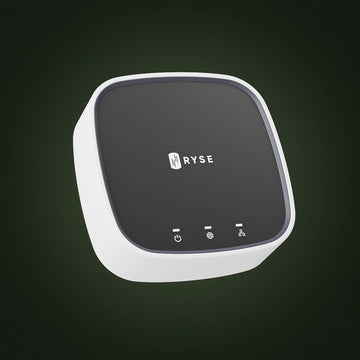
Routines run through the RYSE SmartBridge ($49.99), so you will need one connected before you start.
- Open the RYSE app and tap the Routines icon at the bottom right of the dashboard.
- Tap "Create Routine" or the + button, then give it a clear name like "Plant Window Morning."
- Select the window or windows the routine should move.
- Set the time and choose the days it repeats. You can also choose to set up a Sunrise/Sunset routine to follow the sun even more effectively!
- Use the slider to choose the position, then tap Save.
- Repeat for each step of your plan, so you end up with a short series of named routines.
The full walkthrough with screenshots is available in the RYSE help center: Creating a Routine. Anyone you have shared SmartBridge access with will see the same routines in their app, which helps when a housemate wonders why the living room shade moves at 1:00 PM.
Small Tricks That Make a Big Difference
- Name routines by plant zone. "Fern Corner Afternoon" is easier to find and edit than "Routine 3."
- Use the toggle when plants travel. If you move plants to another room for a few weeks, turn their routines off instead of deleting them. The routine stays saved and is ready to switch back on.
- Turn pots weekly. Even light from a routine still comes from one side. A quarter turn each week keeps growth even.
- Use Alexa, Google Home, or HomeKit for voice control. For easy hands-free commands outside the schedule, connect with your smart hub of choice to enable voice control.
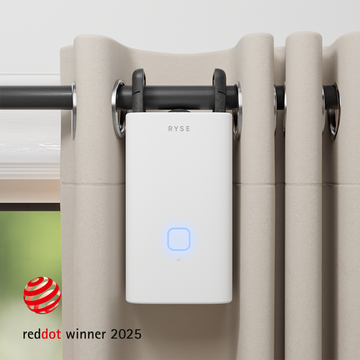
- Keep the chain tidy. The SmartShade mounts on the beaded chain of your existing roller, zebra, or solar shade, so there is no cord dangling into your plant pots.
Give Your Plants a Better Winter
Indoor plants do not need a greenhouse to get through the dark months. They need consistent access to the light you already have. A SmartShade on a sunny window, a SmartBridge, and a few simple routines turn your blinds into a quiet light manager that works automatically, whether you are home or not. Make your routine easier and make your plants happy with RYSE!
Share with your community!
In this article
Sign up for our newsletter
Latest from experts

Automate Light for Your Houseplants: Smart Shade Routines for Fall and Winter

The Daylight Handoff: How Smart Shades and Smart Lights Can Take Turns Through the Day
